
How to fix ai tool errors usually comes down to one thing: you need to identify whether the failure is coming from your input (prompt/data), the model settings, your integration, or the provider itself. If you guess, you’ll waste hours chasing the wrong “fix.”
Most AI tools feel magical right up until they don’t, a response suddenly becomes nonsensical, the API times out, the tool refuses files it accepted yesterday, or your “simple” automation starts returning empty fields. The frustrating part is that many errors look similar on the surface.
This guide focuses on practical troubleshooting you can do without turning into an ML engineer. You’ll get a quick diagnostic framework, a checklist, a few repeatable fixes by scenario, plus a small table to map common symptoms to likely causes.

What counts as an “AI tool error” (and why it matters)
People lump everything under “the AI is broken,” but there are a few distinct buckets. Naming the bucket is half the solution, because each bucket has a different fix.
- Quality failures: hallucinated facts, wrong tone, missing sections, inconsistent formatting.
- Reliability failures: timeouts, rate limits, intermittent 5xx errors, sudden slowdowns.
- Data and file failures: upload rejected, extraction incomplete, RAG returns irrelevant sources.
- Integration failures: webhook payload mismatch, parsing breaks, JSON invalid, downstream app rejects output.
- Safety and policy blocks: content filters, “I can’t help with that,” blocked attachments.
According to NIST, managing AI risk includes focusing on reliability, transparency, and monitoring across the system lifecycle, not only the model output. That’s a good reminder that your tool, your pipeline, and your inputs are all part of the “AI system.”
Fast diagnosis: the 10-minute triage checklist
If you only do one thing, do this. The goal is to isolate variables quickly so you stop “fixing” the wrong layer.
Step 1: Reproduce with the smallest possible input
- Copy the prompt, remove extras, keep the core ask.
- Swap large files for a tiny sample.
- Try one record instead of a batch.
Step 2: Confirm whether it’s you or the provider
- Check the vendor status page, incident reports, and rate-limit docs.
- Try the same request from a different network or environment if possible.
- Run a simple “hello world” prompt to see if the model responds at all.
Step 3: Capture evidence before you change anything
- Save request IDs, timestamps, model/version, temperature, max tokens.
- Log the raw response (including tool calls / function outputs).
- Record the exact input text and any system instructions.
This is the boring part people skip, then later they can’t explain why a fix “worked” once and never again.
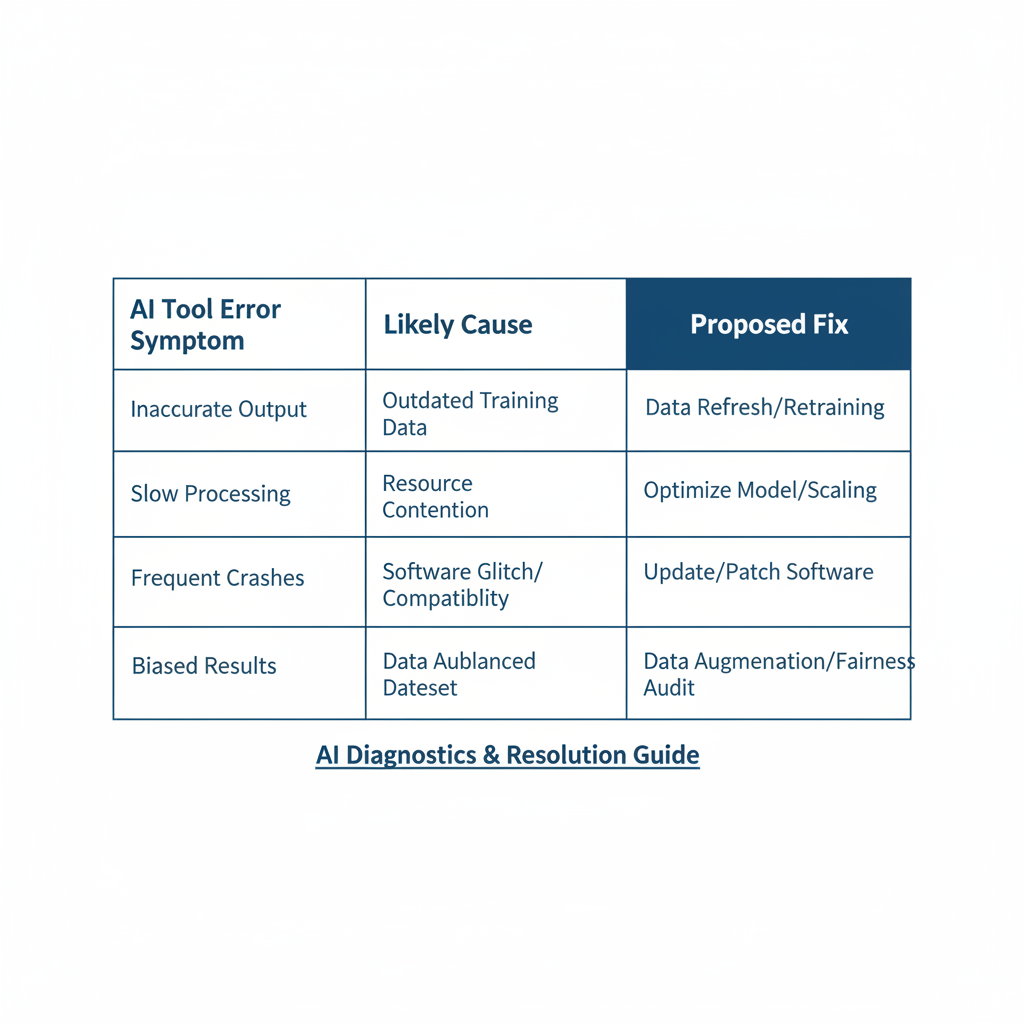
Common symptoms and likely causes (quick mapping table)
Use this table to narrow your next step. It’s not perfect, but it prevents random thrashing.
| Symptom | Most likely causes | First fix to try |
|---|---|---|
| Timeouts or very slow responses | Rate limits, large context, provider latency, network issues | Reduce input size, lower max tokens, add retries with backoff |
| “Invalid JSON” / broken structure | Prompt too open-ended, model drift, bad parsing rules | Use strict JSON schema instruction, validate and repair step |
| Hallucinated facts | No sources, weak constraints, outdated knowledge, ambiguous question | Require citations, add context, use retrieval, add “don’t guess” rule |
| Tool refuses file or extraction is incomplete | Unsupported format, file too large, OCR issues, encoding problems | Convert format, chunk files, run OCR, normalize encoding |
| Sudden content blocks | Safety policy triggers, sensitive topics, phrasing flags | Rephrase neutrally, remove sensitive details, use allowed alternatives |
Fixes for prompt and output-quality errors (the stuff users feel first)
When people search how to fix ai tool errors, they often mean “the output is wrong.” In many cases, the tool is functioning, it’s just under-specified.
Make ambiguity expensive for the model
- Define success: “Return 5 bullet points, each 18–24 words, no fluff.”
- Define boundaries: “If you’re unsure, say ‘Not enough information’ and list what’s missing.”
- Define audience: “Write for a US small-business owner, friendly but direct.”
Use “show your work” without forcing chain-of-thought
You don’t need the model to reveal internal reasoning. What you do need is a verifiable output format.
- Ask for sources or references when factual accuracy matters.
- Ask for assumptions as a short list, so you can approve or correct them.
- Ask for confidence labels (high/medium/low) for key claims.
According to OpenAI, prompt clarity and explicit formatting constraints often improve consistency for structured outputs. In practice, that means fewer “creative” surprises when you need deterministic results.
Stabilize with model settings
- Lower temperature when you need repeatable formatting.
- Increase max tokens only when truncation is the real issue.
- Stop sequences help when the model keeps rambling past the target.
Fixes for API, rate limit, and uptime errors (the stuff engineers see)
Reliability issues are rarely solved by “better prompts.” If you’re calling an API, treat it like any other external dependency.
Implement sensible retry logic
- Retry on: timeouts, 429 rate limits, transient 5xx.
- Don’t retry on: malformed requests, auth errors, consistent 4xx.
- Use exponential backoff and jitter to avoid retry storms.
Batching and concurrency: fewer parallel calls can be faster
A common trap is firing 200 requests at once, getting throttled, then assuming the model is “down.” Try smaller batches, queue jobs, and cap concurrency.
Protect production with timeouts and fallbacks
- Set a hard timeout, then fall back to a simpler model or cached answer.
- Cache stable outputs (policies, templates, repeated summaries).
- Log token usage and latency per endpoint so you spot regressions early.
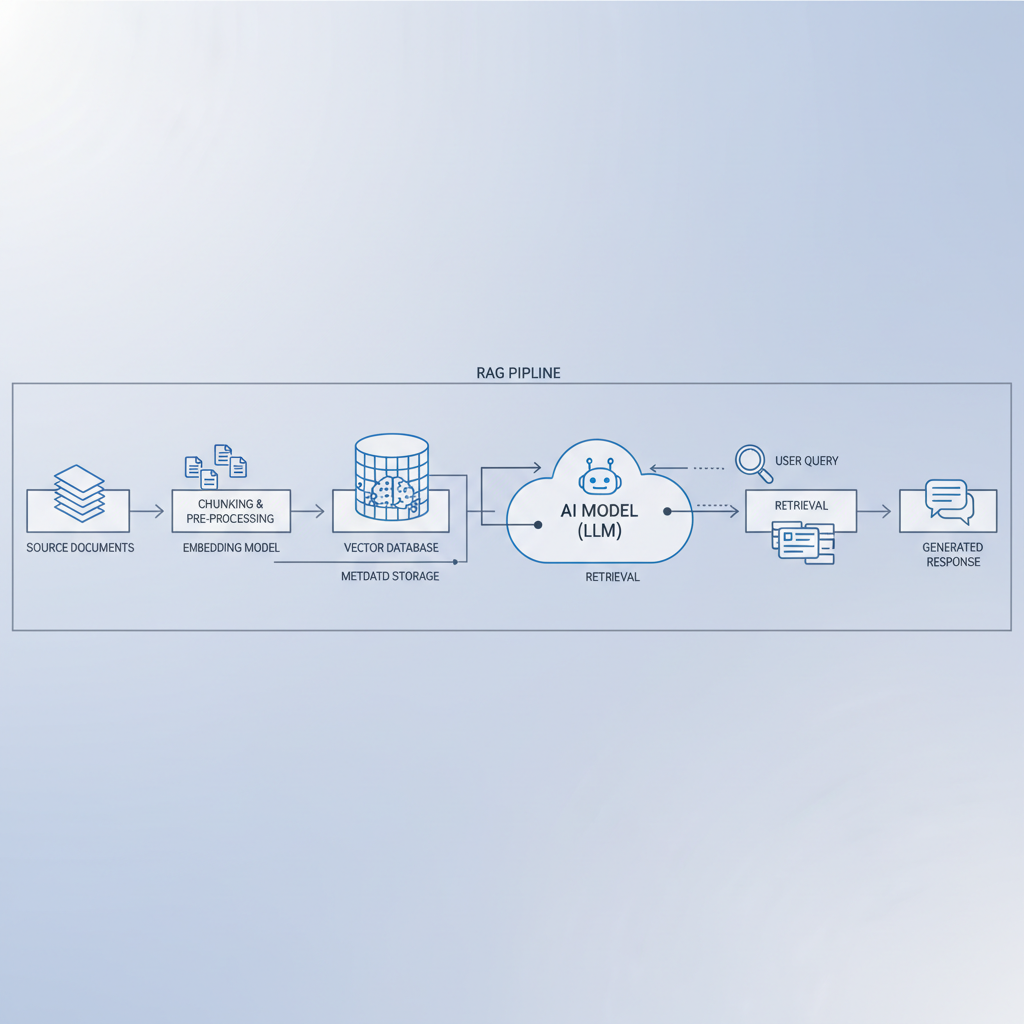
Fixes for data, files, and retrieval (RAG) errors
Many “AI tool errors” are actually data plumbing issues: the model never saw the right information, so it guessed, or it saw too much noise and picked the wrong thing.
Clean input before you blame the model
- Normalize encoding to UTF-8 and strip invisible characters.
- Remove headers/footers and repeated boilerplate in PDFs.
- Chunk documents by meaning, not by arbitrary token length when possible.
Make retrieval measurable
- Log which documents were retrieved and why (scores, keywords).
- Test with “known answer” queries to see if retrieval finds the right chunk.
- Keep a small evaluation set: 20–50 questions that reflect real usage.
According to Google’s Search Central guidance on helpful content principles, content should be grounded in usefulness and clarity. For RAG, that translates into: your source material must be readable, well-structured, and not full of repeated junk, otherwise retrieval quality drops.
Fixes for integration and “automation broke” errors
If your AI sits inside Zapier/Make, a CRM workflow, or your own app, failures often happen after the model responds. The model output is “fine,” but your system can’t consume it.
Force structure, then validate it
- Return JSON only, no markdown fences, no commentary.
- Specify a schema with required fields and allowed values.
- Run server-side validation, then trigger a repair prompt only when needed.
Design for partial failure
- If one field fails, don’t discard the entire record.
- Store raw output for debugging, but sanitize it if it contains sensitive data.
- Use idempotency keys so retries don’t create duplicates.
Practical “do this next” playbook (by scenario)
Here’s a simple set of next actions that tends to work in real teams, especially when the same error keeps resurfacing.
- If outputs look wrong: tighten formatting rules, add “don’t guess,” require sources for factual claims, reduce temperature.
- If outputs are cut off: shorten input, raise max tokens cautiously, ask for a two-pass answer (outline then expand).
- If you see timeouts: reduce context size, add retries with backoff, cap concurrency, verify provider status.
- If RAG answers ignore your docs: inspect retrieved chunks, improve chunking, adjust top-k, remove boilerplate.
- If automations fail randomly: enforce JSON schema, validate, store raw responses, add a repair step.
Key takeaway: the fastest way to learn how to fix ai tool errors is to stop treating them as one category. Pick the bucket, isolate the variable, then apply the smallest fix that changes the outcome.
Conclusion: make AI errors boring (repeatable fixes, not heroics)
Most teams don’t need a fancy framework, they need a consistent routine: reproduce the issue, log the inputs and settings, isolate whether the problem is prompt, data, integration, or provider, then apply one targeted change. When you do that, AI issues become predictable and far less stressful.
If you want a simple starting point, choose one: add structured output validation, or add better logging. Either one makes the next incident easier, and that’s usually where the real ROI shows up.